If a Tampa service business asked me where to start with AI automation, I would not start with a chatbot.
I would start with the parts of the business where money leaks every week.
Missed calls. Slow lead response. Intake forms that turn into copy-paste work. Estimates that never get followed up. Customers who forget appointments. Owners who only find out what happened after the week is already over.
That is where automation has real value.
Not because it is trendy. Because it gives time back and protects revenue.
Data point: The U.S. Chamber reported that 58% of small businesses use generative AI, up from 40% in 2024 and more than double the 2023 adoption rate. Adoption is not the hard part anymore. The hard part is connecting AI to work that actually matters.
The Rule: Automate Close To Revenue First
The first automation should be boring, visible, and tied to a number you care about.
That number might be response time, booked appointments, no-shows, estimate close rate, unpaid invoices, staff hours, or customer reviews.
Do not start with a workflow that happens once a quarter. Do not start with a messy edge case. Do not start with something that depends on deep human judgment.
Start where the rules are mostly clear and the pain shows up every week.
For most local service businesses, these are the first five I would look at.
1. Missed-Call Text Back
If someone calls and nobody answers, the business should not wait until someone checks voicemail.
A simple missed-call automation can send a text within seconds:
"Sorry we missed you. What do you need help with today?"
From there, the workflow can collect the service needed, location, urgency, and preferred time. If it is high priority, it can alert the owner or dispatcher. If it is routine, it can send a booking link or create a CRM record.
This is one of the best first automations because it is fast to launch and easy to measure.
Before automation:
- Calls go to voicemail.
- Staff call back later.
- Some leads already moved on.
After automation:
- The caller gets an immediate response.
- The business captures the request.
- The right person gets notified.
- The CRM has a record.
This fits home services, medical offices, law firms, event venues, auto shops, and any business where phone calls matter.
2. Lead Intake That Creates The Next Step
Most lead forms are too passive.
They collect a name, email, phone number, and maybe a message. Then the business still has to figure out what the person wants, how urgent it is, who should handle it, and what should happen next.
Better intake does more than collect contact information.
It should:
- identify the service requested
- ask the right qualifying questions
- check service area
- tag the lead by urgency or type
- create a CRM record
- notify the right person
- send the prospect a clear next step
AI helps when the request is messy. It can summarize the message, pull out important details, and route the lead correctly.
But the workflow should still have guardrails. A medical practice, law firm, or financial business should not let AI make sensitive decisions without review.
The goal is not to remove humans. The goal is to stop making humans retype the same information into five systems.
3. Estimate Follow-Up
This is where a lot of small businesses quietly lose money.
Someone asks for an estimate. The team sends it. Then follow-up depends on memory, sticky notes, or whether the owner has time.
That is not a system.
A strong estimate follow-up workflow can:
- send a same-day confirmation
- follow up after 24 or 48 hours
- answer common questions
- remind the estimator or owner when a high-value quote is stale
- tag closed, delayed, lost, or won opportunities
- ask why the customer did not move forward
You do not need a giant AI platform for this. In many cases, a CRM, email/SMS sequence, and a simple review step are enough.
AI becomes useful when replies need interpretation. If the customer says, "We are waiting on insurance" or "Can you do Tuesday morning instead?" the system can summarize that and route it to a human with context.
4. Appointment Reminders And No-Show Recovery
No-shows are not just annoying. They break the schedule.
A basic appointment workflow should confirm the time, send reminders, make rescheduling easy, and alert the team when someone cancels.
For service businesses, reminders can also collect prep details:
- gate code
- parking notes
- pet instructions
- photos
- insurance documents
- preferred contact method
For medical or professional services, the same idea applies, but privacy rules matter. Keep the reminders clean, limit sensitive details, and use secure systems where required.
The best version is not just "your appointment is tomorrow."
It is "your appointment is tomorrow, here is what we need from you, reply if anything changed, and here is what happens next."
5. Owner Reporting
This one is not as flashy, but it might be the most underrated.
Every owner wants to know what happened this week:
- How many leads came in?
- How many were contacted?
- How many booked?
- Which source produced the best leads?
- Which estimates are still open?
- Which invoices are overdue?
- What needs attention Monday morning?
Most businesses already have this data scattered across phone systems, forms, calendars, CRMs, spreadsheets, QuickBooks, and inboxes.
An automation can pull the important numbers into a short daily or weekly summary. AI can explain what changed, flag exceptions, and call out what needs a human decision.
That gives the owner visibility without digging through every tool.
What I Would Not Automate First
I would not start with employee performance decisions.
I would not start with pricing approvals.
I would not start with legal, medical, or financial judgment.
I would not start by giving an AI tool broad access to every system.
And I would not start with a workflow the team cannot explain on a whiteboard.
AI automation works best when the business process is clear enough to test. If the process is unclear, map it first.
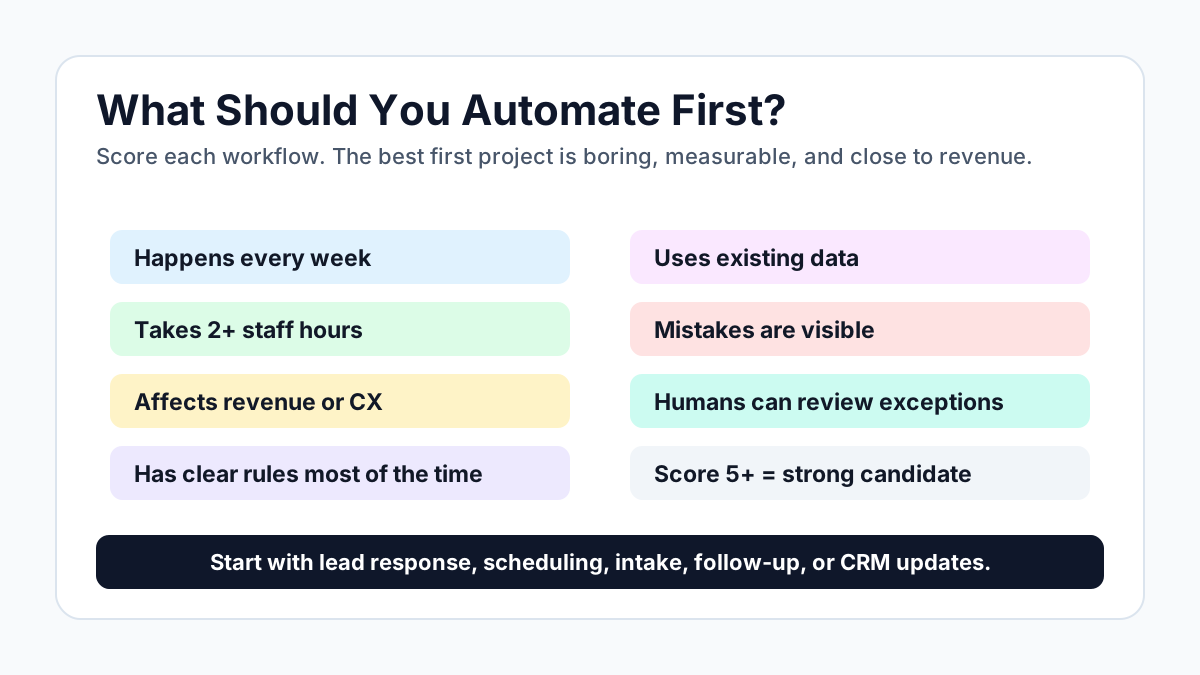
Quick Scorecard
Score each workflow before you build anything:
- It happens every week.
- It takes more than two hours of staff time.
- It affects revenue or customer experience.
- It has clear rules most of the time.
- It uses data that already exists somewhere.
- Mistakes are visible and fixable.
- A human can review exceptions.
If a workflow scores five or higher, it is probably a good automation candidate.
If you want a cleaner worksheet version, use the AI automation checklist to score the workflow, print it, or send it to your team.
The Practical Starting Point
Pick one workflow from the five above.
Write down what happens today. Write down what should happen instead. Identify the systems involved. Decide where a human needs to approve the work. Then build the smallest version that improves the number you care about.
That is how automation becomes useful.
Tech Adventures builds AI automation for Tampa Bay businesses that need practical systems, not more software clutter. If you want help choosing the first workflow, start with AI automation services in Tampa, use the AI automation checklist, or try the AI receptionist demo.
Sources:
Frequently Asked Questions
What should a Tampa service business automate first?
Start with the workflow closest to revenue: missed-call response, lead intake, estimate follow-up, appointment reminders, or simple owner reporting. These are repetitive, measurable, and easy to improve without changing the whole business.
Do I need AI for every automation?
No. Some automations only need forms, CRM rules, text messages, calendar reminders, or reporting scripts. AI is useful when the work needs interpretation, summarization, routing, drafting, or natural conversation.
Ready to Automate Your Business?
Book a free workflow review and discover which processes you should automate first.