A CRM does not fix follow-up by itself.
Plenty of Florida service businesses have a CRM and still lose leads.
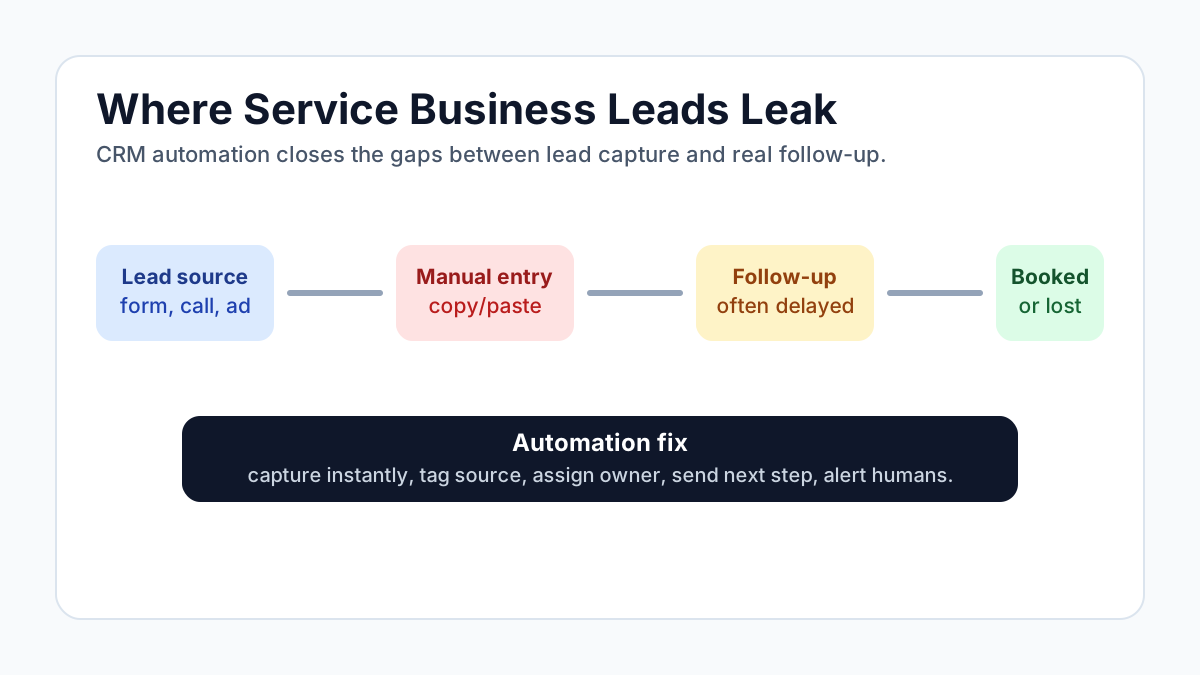
The problem is not always the software. It is the manual work around the software: someone has to enter the lead, update the status, send the follow-up, create the task, remember the reminder, and notify operations.
When the team gets busy, those steps slip.
CRM automation fixes the gaps between intention and execution.
Data point: The U.S. Census Bureau reported 523,971 business applications in May 2026, up 3.7% from April. In a crowded service market, faster follow-up is not just operational hygiene. It is a competitive advantage.
What CRM Automation Actually Does
CRM automation connects the moments in your sales and service workflow.
It can capture leads from forms, calls, ads, and chat. It can create or update contact records, tag leads by service and urgency, assign the right team member, send follow-up messages, create tasks, book appointments, notify staff, request reviews, and summarize activity for the owner.
The goal is not to make the CRM more complicated. The goal is to make it harder for good opportunities to disappear.
Why Florida Service Businesses Need It
Florida service businesses deal with a lot of moving parts.
Seasonal demand. Snowbirds. Storm season. Fast-growing neighborhoods. High competition. Staff turnover. Local referrals. Social media messages. Calls after hours.
That creates lead leakage.
A lead might come from Google Business Profile, Facebook, a website form, a phone call, a referral partner, a chamber listing, a trade show, or an old customer.
If every source lands in a different place, the team has to stitch the process together manually.
The First CRM Automation: Instant Lead Capture
Every lead source should create a usable record.
At minimum, the record should include name, phone or email, source, service needed, location, urgency, first message, and next step.
If the lead comes through a form, that can happen automatically. If it comes through a call, the call summary can become the record. If it comes from an ad, the UTM data should be saved.
You cannot improve what you cannot see.
The Second Automation: Follow-Up
Most businesses do not need more leads as badly as they need better follow-up.
A basic sequence might include an instant confirmation, follow-up after 15 minutes if no booking, a reminder after one day, a helpful resource after three days, and a final check-in after seven days.
This should not feel spammy. It should be useful, short, and relevant to the request.
For high-value leads, automation should notify a human immediately.
The Third Automation: Status Hygiene
CRMs get messy because status updates feel like admin work.
Automation can help by changing statuses when real events happen: form submitted, call completed, appointment booked, proposal sent, invoice paid, project started, or review requested.
This gives the owner better reporting without forcing the team to remember every click.
What To Avoid
Avoid automating a bad process.
Before building, answer: What counts as a qualified lead? Who owns the next step? When should a human take over? What should never be sent automatically? What data should not be stored? What reports actually matter?
Use the CRM lead leakage calculator to estimate how much slow follow-up and messy handoffs may be costing each month.
Tech Adventures builds CRM automation for Florida service businesses that need cleaner follow-up, better routing, and fewer missed opportunities. Start with business automation services or run a quick automation ROI check.
Sources:
Frequently Asked Questions
What is CRM automation?
CRM automation uses rules, integrations, and sometimes AI to update records, route leads, send follow-ups, create tasks, and keep customer data moving without manual copy and paste.
What CRM tasks should service businesses automate first?
Start with lead capture, status updates, appointment reminders, missed follow-up alerts, review requests, and handoffs between sales and operations.
Ready to Automate Your Business?
Book a free workflow review and discover which processes you should automate first.