A lot of businesses are using the same words for very different tools.
Chatbot. AI agent. AI receptionist. Virtual assistant. Voice agent.
They sound similar, but they solve different problems.
Choosing the wrong one usually leads to disappointment. A chatbot cannot fix a broken intake process. An AI receptionist will not automatically clean up your CRM. An AI agent should not be given broad control over a messy workflow with no guardrails.
Data point: BLS reported the median hourly wage for receptionists was $17.90 in May 2024. For small businesses, the AI receptionist conversation is not only about replacing voicemail. It is about covering calls the team cannot consistently staff.
What A Chatbot Does
A chatbot is usually a website or messaging tool that answers questions.
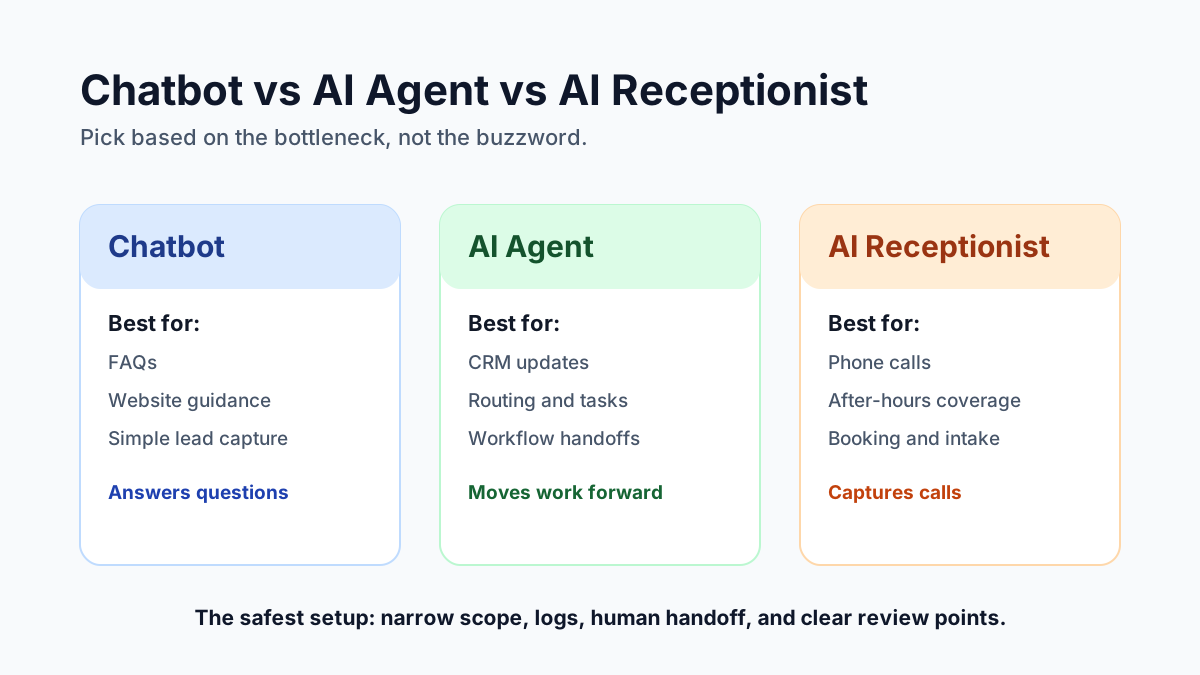
It is useful for basic FAQs, service explanations, lead capture, routing people to the right page, collecting simple contact details, and answering common objections.
A good chatbot can improve a website experience. It can help a visitor find the right service faster.
But if it only talks and does not connect to your systems, it is not really operating the business workflow.
What An AI Agent Does
An AI agent is more workflow-oriented.
An agent can read a lead form, classify the request, ask follow-up questions, create or update a CRM record, draft a response, notify a staff member, summarize a call, schedule a task, or prepare a quote packet.
The key difference is action. A chatbot answers. An agent can help move work forward.
That does not mean the agent should do everything alone. The best AI agents have limits, logs, and human handoffs.
What An AI Receptionist Does
An AI receptionist handles phone conversations.
This matters because phone calls are still high-intent.
An AI receptionist can answer after-hours calls, ask why the person is calling, qualify the lead, book appointments, collect callback details, route urgent calls, summarize the conversation, and send a follow-up text or email.
For small businesses, the value is simple: fewer missed calls and faster response.
Which One Should You Start With?
Start with the channel where you are losing the most opportunity.
If website visitors are confused, start with a chatbot or better website copy.
If leads are getting stuck between systems, start with an AI agent workflow.
If calls are being missed, start with an AI receptionist.
If your team is buried in manual follow-up, start with automation around CRM and email.
The right tool depends on the bottleneck.
Safety Matters
AI should not have unlimited access by default.
For business use, a safer setup includes limited permissions, clear workflow scope, logs of what happened, human approval for sensitive actions, fallback to a real person, testing before launch, and periodic review.
This matters even more for medical, legal, and financial workflows.
Try The Live Demos
Tech Adventures builds AI agents, chatbots, and AI receptionist workflows for Tampa Bay businesses. The fastest way to understand the difference is to test one.
Try the AI receptionist demo if missed calls are the problem, or try the live chatbot demo if website chat, SMS follow-up, and social DMs are the bigger gap.
You can also browse the full AI and automation demos hub to see the other workflows being packaged.
Sources:
Frequently Asked Questions
Is an AI agent the same as a chatbot?
No. A chatbot usually answers questions in a chat window. An AI agent can follow a workflow, use tools, update records, trigger tasks, and hand work to a human when needed.
When should a business use an AI receptionist?
Use an AI receptionist when calls matter, after-hours coverage is weak, staff miss calls, or simple booking and qualification should happen before a human gets involved.
Ready to Automate Your Business?
Book a free workflow audit and discover which processes you should automate first.